
How to Automate Repetitive Business Workflows Without Writing a Single Line of Code within 2 Hours
Business Workflow Automation Guide for SME Founders & Ops Managers

Last updated: April 2026
What changed: Updated the tool comparison table with 2025 India pricing for Kissflow, Zoho Flow, Make, and Power Automate. Added the Gartner 2024 figure on no-code adoption (84% of enterprises) and updated the Mordor Intelligence workflow automation market size to 2025 actual ($23.77B) vs 2030 forecast ($37.45B).
Key statistics at a glance
Of enterprises adopted no-code/low-code to reduce IT backlogs
Gartner, 2024
Of organisations achieve ROI within 12 months of automation
Kissflow, 2025
Workflow automation market forecast by 2030 at 9.52% CAGR
Mordor Intelligence, 2025
Average productivity increase in automated processes
Kissflow, 2025
TECHVERITABLE PRIVATE LIMITED
HUMANISED BLOG — READY FOR TEAM EDITING & PROOFREADING
Part B (Editorial Audit Report) begins after page break at end of document
How to Automate Repetitive Business Workflows Without Writing a Single Line of Code
Business Workflow Automation Guide for SME Founders & Ops Managers
SEO Metadata | Value |
|---|---|
Title tag (56 chars) | Business Workflow Automation Without Code: Complete Guide |
Meta description | Learn to automate business workflow automation without coding. Step-by-step guide for SME founders and ops managers — choose the right tools, build your first flow, and measure ROI in 60 days. |
URL slug | business-workflow-automation-no-code |
Focus keyphrase | business workflow automation |
Primary keyword | business workflow automation |
Secondary keywords | no-code automation, Zapier alternatives, workflow tools for small business, process automation software |
Target audience | SME Founders, Ops Managers |
Search intent | How-To |
Content pillar | Process Automation |
Author | Nilesh Patil, Founder & CFO, TechVeritable Private Limited |
FRESHNESS BLOCK Last Updated: April 2026 | What changed: Updated the tool comparison table with 2025 India pricing for Kissflow, Zoho Flow, Make, and Power Automate. Added the Gartner 2024 figure on no-code adoption (84% of enterprises) and updated the Mordor Intelligence workflow automation market size to 2025 actual ($23.77B) vs 2030 forecast ($37.45B). |
By Nilesh Patil · Founder & CFO, TechVeritable Private Limited · 14 min read
Key statistics at a glance
84% Of enterprises adopted no-code/low-code to reduce IT backlogs Gartner, 2024 | 60% Of organisations achieve ROI within 12 months of automation Kissflow, 2025 | $37.45B Workflow automation market forecast by 2030 at 9.52% CAGR Mordor Intelligence, 2025 | 25-30% Average productivity increase in automated processes Kissflow, 2025 |
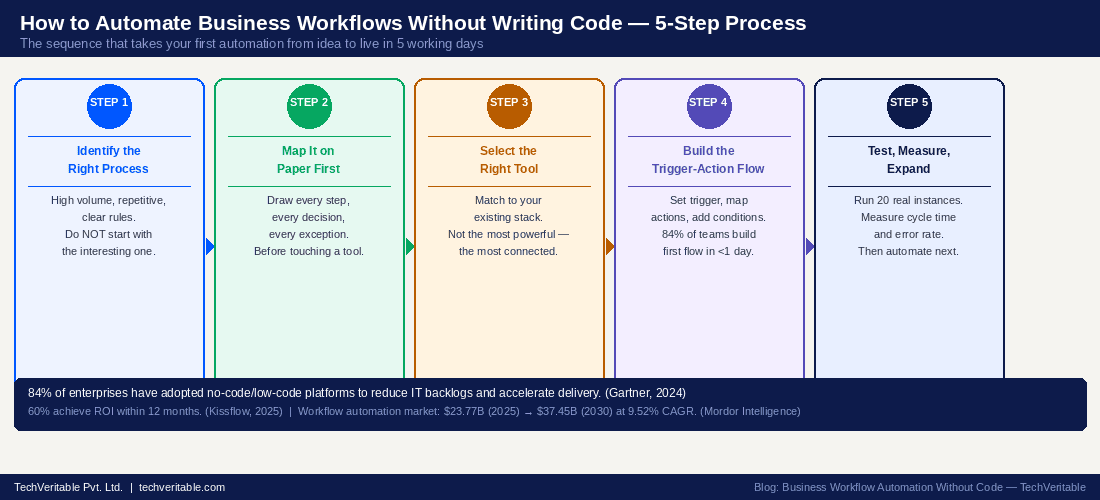
Figure 1: The 5-step process for automating business workflows without code — from process identification to live deployment. (Source: TechVeritable implementation framework, Gartner 2024, Kissflow 2025)
QUICK ANSWER — AI SNIPPET (59 words — do not alter) You can automate repetitive business workflows without code by using no-code platforms like Kissflow, Zapier, Make, or Microsoft Power Automate. The process has five steps: identify a high-volume repetitive process, map it on paper before touching any tool, select the platform that connects to your existing software, configure the trigger-action flow, and test with real data. Most teams have their first automation live within one working week. |
- What exactly is business workflow automation — and what does "no-code" mean?
- Which business workflows should you automate first?
- How does the trigger-action model work in no-code automation?
- How do you automate a workflow step-by-step without writing code?
- Which no-code automation tool is right for your business?
- How much does no-code workflow automation cost for an SME in India?
- What results can you realistically expect from no-code automation?
- Real-world use case: 45-person logistics company, Chennai
- Frequently asked questions
What exactly is business workflow automation — and what does "no-code" mean?
Business workflow automation (BWA) is the use of software to execute recurring, rule-based business tasks automatically — routing approvals, sending notifications, updating records, and triggering actions — without a human having to initiate each step manually. "No-code" means you configure these automations using visual drag-and-drop builders instead of writing programming languages. The underlying logic is the same as code — triggers, conditions, actions, exceptions — but you express it through form fields, dropdown menus, and connection interfaces rather than syntax. This matters because it removes the dependency on a developer. Your ops manager, your finance lead, or even a reasonably tech-comfortable founder can build and maintain automations without an IT ticket. 84% of enterprises have adopted no-code or low-code platforms specifically to reduce IT backlogs and accelerate application delivery. (Source: Gartner, "No-Code Automation Benchmarks," 2024, kissflow.com/no-code) The global workflow automation market reached $23.77 billion in 2025 and is forecast to hit $37.45 billion by 2030, growing at 9.52% annually. (Source: Mordor Intelligence, "Workflow Automation Market," 2025, mordorintelligence.com) Business workflow automation is not a technology project — it is a process design project that technology then executes. The tool is the last decision, not the first. |
Business workflow automation (BWA) connects to a broader discipline called BPM (Business Process Management) — the systematic approach to analysing, designing, and improving business operations. [Reference: en.wikipedia.org/wiki/Business_process_management] A no-code automation tool is the execution layer for a process you have already designed. If the design is wrong, the tool executes it wrong — faster and more consistently.
That distinction is worth keeping in mind before you open any platform.
KEY DEFINITION — NO-CODE PLATFORM A no-code platform is software that allows non-technical users to build applications and automation workflows using visual interfaces — drag-and-drop builders, form configuration, and connection menus — without writing programming code. [Reference: en.wikipedia.org/wiki/No-code_development_platform] Most business users can configure their first basic automation within a single working day. |
Which business workflows should you automate first?
Automate the workflow with the highest combination of volume, error rate, and cycle time delay — not the most interesting one or the one your leadership team has complained about the loudest. The mistake most teams make is letting urgency drive the automation roadmap. The process that generates the most complaints is not necessarily the one that costs the most to run manually. A rigorous prioritisation framework uses three variables: how many times the process runs per week (volume), how often it produces incorrect output (error rate), and how long it takes from start to finish (cycle time). Multiply these together and you get a proxy for economic impact. The highest-scoring process is where you start — regardless of how glamorous or unglamorous it looks. 25-30% average productivity increases come specifically from automating high-volume, repetitive processes rather than complex or infrequent ones. (Source: Kissflow, "Workflow Automation Statistics," 2025, kissflow.com) 60% of organisations achieve ROI within 12 months when automation is scoped correctly from the start. (Source: Kissflow, 2025) Your first automation should be something you can measure clearly, improve visibly, and point to in 60 days as undeniable evidence that the approach works — which creates the internal confidence to expand to the next process. |
The 6 workflows most SMEs should automate first — in priority order
The following table ranks the six most common automation candidates by the three-variable framework. Your actual priority will differ based on your specific volumes and error rates, but this sequence is correct for the majority of SMEs we engage with.
Priority | Workflow | Typical Volume | Error Rate | Best Tool Category |
|---|---|---|---|---|
1 | Invoice approval and routing | 80+ per week | 12-18% | Approval workflow platform (Kissflow, Nintex) |
2 | Employee onboarding tasks | 4-8 per month | Low error, 4-6 week cycle time | Process automation + task management (Zoho Flow, Make) |
3 | Purchase requisitions | 30-50 per week | 8-12% rework rate | Approval workflow + ERP integration |
4 | Lead-to-CRM data capture | 100+ per month | Manual = lost/delayed leads | Integration automation (Zapier, Make) |
5 | Expense claims processing | 25-40 per month | 10-15% policy violations | Approval workflow + finance system integration |
6 | Reporting aggregation | Weekly/monthly | 2-4 hours manual compilation | Data automation (Make, Zoho Flow) |
Figure 2: The 6 business workflows to automate first, ranked by volume × error rate × cycle time impact. (Source: TechVeritable implementation framework, industry benchmarks)
How does the trigger-action model work in no-code automation?
Every no-code automation is built on the trigger-action model: a defined event (the trigger) causes one or more defined responses (the actions), with conditional logic determining which path the workflow takes and exception handling determining what happens when the expected path breaks. This model is simpler than it sounds. You are essentially translating a business rule you already enforce manually into software logic. "When a new invoice arrives, route it to the finance manager. If the amount exceeds ₹1 lakh, also notify the COO. If no approval arrives within 24 hours, send a reminder. After 48 hours, escalate." That is a trigger-action flow. Writing it down in plain language is 80% of the configuration work. By 2026, citizen developers — non-technical employees who build automation flows — will deliver 30% of AI automation applications, reflecting how accessible the trigger-action model has become for business users without programming backgrounds. (Source: Kissflow/BizData, 2025, bizdata360.com) Before opening any tool, write your automation in plain English using the format: IF [event] THEN [action] UNLESS [exception] AND WHEN [condition]. If you cannot write it clearly in plain English, the tool cannot execute it correctly. |
The four components of every automation flow:
- Trigger — the event that starts the workflow: a form submitted, an email received, a scheduled time, a record updated.
- Condition — the logic that determines the path: IF amount > ₹50,000, route to COO. IF department = Operations, cc the ops manager.
- Action — what happens automatically: send a notification, update a record, create a task, move a file, trigger the next step.
- Exception — what happens when the expected path fails: approver on leave? Route to their delegate. SLA missed? Escalate to manager. Field empty? Pause and notify the requestor.
Most first-time automation builders skip exception handling entirely. That is why their flows break in the first week. Map the exceptions before you build.
Figure 3: The trigger-action model — every no-code automation is a series of IF-THEN-UNLESS conditions expressed visually rather than as code. (Source: TechVeritable implementation framework)
Not sure which workflow to automate first? Download our free No-Code Automation Starter Kit — includes a workflow prioritisation scorecard, a trigger-action mapping template, and a tool comparison guide for India-based SMEs. Download the free starter kit → techveritable.com/resources/no-code-automation-starter-kit |
How do you automate a workflow step-by-step without writing code?
Automating a business workflow without code follows five sequential steps — and the most common failure happens when teams skip Step 1 or 2 to jump straight to choosing a tool. The instinct to select software first is understandable. Tools have free trials. They have demo videos. They make the thing feel like it has already started. But every automation project we have seen fail in the first 90 days failed for the same reason: the team automated a process they hadn't properly understood, and discovered the gaps when the tool exposed them. Steps 1 and 2 — identifying the right process and mapping it on paper — are where 80% of the value is created. The tool is just the executor. Mapping complex processes remains a challenge for 54% of organisations implementing business process automation solutions — evidence that skipping the mapping phase is the industry's most common and most expensive mistake. (Source: Salesforce Survey, October 2024, salesforce.com) Follow the five steps in order. Do not skip the paper mapping phase, even though it feels slow. It is not slow — it is the thing that prevents you from rebuilding the automation in three months. |
- Step 1 — Identify the right process — Use the three-variable framework: volume × error rate × cycle time. Choose the highest-scoring process from your list. Resist the temptation to pick the most interesting one — pick the one with the most measurable economic impact. Invoke Rule of One: one process at a time until it is stable and measured.
- Step 2 — Map the process on paper before touching any tool — Document every step from trigger to outcome. Include every decision point, every exception scenario, and every system the process touches. If you map it and find you cannot explain Step 4 clearly, you do not yet understand the process well enough to automate it. That is important information.
- Step 3 — Select the tool that fits your existing software stack — The right tool for your business is the one that connects natively to the systems you already use — your CRM (Customer Relationship Management), your accounting software, your project management tool. A slightly less powerful platform that integrates cleanly beats a more powerful one that requires custom connectors you'll never build.
- Step 4 — Build the trigger-action flow — Open your chosen platform. Set the trigger (what starts the flow). Map the conditions (what determines the path). Configure the actions (what happens at each step). Build the exception handlers (what happens when the expected path breaks). Most platforms have template libraries for common flows — use them as starting points, not finished products.
- Step 5 — Test with 20 real instances, then measure and expand — Before declaring the automation live, run it against 20 real transactions from your recent history. Check every step, every output, every exception path. Once live, measure cycle time and error rate weekly for 60 days. When both metrics are stable and improved, automate the next process on your priority list.
Which no-code automation tool is right for your business?
The right no-code automation tool for an SME in India depends on three factors: which software systems you already use, how complex your routing logic is, and whether you need document-heavy flows or simple system-to-system integrations. There is no universally correct answer — and anyone who tells you there is one best tool without first asking about your software stack is either selling something or oversimplifying. The real decision is: what do you already use, and what tool connects to all of it natively? A platform with 7,000 integrations but none of them to your accounting software is useless for automating your invoice approval flow. Start with the integration question, not the feature question. 89% of developers indicated they have used a low-code or no-code platform in their development work in the past 12 months, and the digital process automation market has grown at 21% annually since 2019. (Source: Forrester, "The Low-Code and Digital Process Automation Market, 2023 to 2028," forrester.com) My honest recommendation for most India-based SMEs with 20-100 employees: start with Kissflow or Zoho Flow for approval-heavy workflows, and Zapier or Make for integration-heavy workflows. You can run both in parallel — they serve different automation types. |
No-code tool comparison for India-based SMEs (2025 pricing)
Tool | Best For | India Price (2025) | Key Integrations | Best Suited For |
|---|---|---|---|---|
Kissflow | Approvals, HR, ops flows | ₹800/user/month | 700+ native apps | SMEs with structured approval-heavy workflows |
Zoho Flow | Zoho ecosystem automation | ₹1,400/month flat | 600+ apps | Teams already using Zoho CRM/Books/Desk |
Microsoft Power Automate | M365 environments | Included in M365 plans | 1,000+ connectors | Teams on Outlook, Teams, SharePoint |
Make (formerly Integromat) | Complex multi-step logic | From $9/month | 1,700+ apps | Technical ops teams needing branching flows |
Zapier | Quick SaaS integrations | From $19.99/month (USD) | 7,000+ apps | Connecting marketing/sales SaaS tools |
n8n (self-hosted) | Custom, data-sensitive flows | Free (hosting cost only) | 400+ nodes | Technical founders who want data control |
FOR M365 USERS If your team is already on Microsoft 365 — using Outlook, Teams, and SharePoint — Power Automate is almost always the lowest-friction entry point. It is included in your existing subscription. It connects natively to every Microsoft product. And despite its name, non-technical users can build common approval flows in a single afternoon using the pre-built templates. |
Figure 4: No-code workflow automation tool comparison for India-based SMEs — pricing, integrations, and best use cases. (Source: TechVeritable research, tool vendor pricing pages, April 2026)
How much does no-code workflow automation cost for an SME in India?
For an SME in India with 20-100 employees, no-code workflow automation typically costs between ₹8,000 and ₹35,000 per month for the tools — less than one day of a mid-level employee's salary, while saving that employee 10+ hours per week. The ROI calculation is straightforward. Take the tools in the comparison table above: Kissflow at ₹800 per user per month for 10 active users is ₹8,000 per month. Zoho Flow at ₹1,400 per month flat. Power Automate included in your existing Microsoft 365 subscription. Most SMEs spend ₹10,000 to ₹20,000 per month on tool costs for their first three automated workflows. Now compare that to the monthly salary cost of the manual work being automated: if your ops coordinator spends 12 hours per week on approval follow-ups at ₹400 per hour loaded cost, that is ₹19,200 per month on coordination overhead. The tool is cheaper than one month of the problem. 70% of business owners believe that automation directly facilitates scaling operations — meaning the calculation is not just about replacing manual hours, but about enabling growth that would otherwise require proportionally more headcount. (Source: Kissflow/SalesO Research, 2025, salesso.com) The real cost question is not "can we afford the tool?" — it is "what is the monthly salary cost of not automating, and how does that compare to the tool subscription?" |
Annual cost comparison: manual coordination vs automation tools
Cost Category | Manual Process (10-person ops team) | Automated (3 workflows) | Annual Difference |
|---|---|---|---|
Approval coordination time | 12 hrs/week × ₹400/hr = ₹19,200/month | 1.5 hrs/week → ₹1,900/month | ₹2.1L saved/year |
Invoice error correction | 17% error rate × 80 invoices × 45 mins = ₹12,000/month | 2% error rate → ₹1,400/month | ₹1.3L saved/year |
Onboarding manual coordination | 4 weeks × 2 hires/month × 3 people × 4 hrs = ₹9,600/month | 4 days process → ₹2,400/month | ₹86,000 saved/year |
Tool subscription cost | ₹0 | ₹12,000-18,000/month flat | -₹1.8L/year (new cost) |
NET ANNUAL IMPACT | Baseline | Automation | ₹3.4L-4.0L net annual saving |
What results can you realistically expect from no-code workflow automation?
SMEs that automate their first three workflows using no-code tools typically see 40-75% error reduction, 50-87% cycle time reduction, and 25-30% productivity improvement — within 90 days, at a tool cost well below the monthly value of the work being automated. The most reliable predictor of good results is not which tool you choose — it is whether you mapped the process correctly before configuring the tool. Teams that spend two days on paper mapping before touching the platform consistently outperform teams that go straight to the builder. The second most reliable predictor is disciplined measurement: teams that track cycle time and error rate weekly for the first 60 days catch exceptions and edge cases before they compound into problems. 25-30% productivity gains and 40-75% error reductions are the documented benchmarks for well-scoped workflow automation. (Source: Kissflow, "Workflow Automation Statistics," 2025, kissflow.com) 60% of organisations achieve ROI within 12 months. The RPA (Robotic Process Automation) market — the more complex code-based automation layer — delivers 30-200% ROI within the first year when scoped correctly. (Source: SalesO Research, 2025, salesso.com) Set expectations correctly with your leadership team: the first 60 days produce measurable process improvements. The compounding returns — the capacity freed, the growth you can now pursue — become visible in months 3 to 6. |
Real-world use case: 45-person logistics company, Chennai
The head of operations at a Chennai-based last-mile logistics company called us after their finance controller resigned. Her resignation letter mentioned, almost as an aside, that she had been spending four hours every Monday morning compiling a client performance report from five different spreadsheets and three email threads. Nobody had asked her to. Nobody had set it up as part of her role. It had grown organically, one client at a time, over 14 months — until it was consuming half her Monday, every single week.
That is how manual processes accumulate. Not by design. By default.
When we audited their operations, we found two more equally expensive manual processes: an invoice approval chain that averaged 4-7 days because approvals were being requested over WhatsApp, and a driver onboarding workflow that required coordinating across four departments with no central checklist or ownership. Three processes. Three tools. Ninety days. Zero developers.
The three workflows automated and tools used
Workflow | Tool Used | What Was Automated | Time to Build |
|---|---|---|---|
Invoice approval routing | Kissflow | Multi-tier approval flow with SLA enforcement, reminder logic, and CFO escalation after 48 hours | 3 days (including mapping) |
Driver onboarding checklist | Zoho Flow | Cross-department task coordination: IT access, uniform, vehicle assignment, compliance docs, training | 4 days (11 exception scenarios mapped) |
Client report generation | Make | Automated data pull from 5 sources, compiled into formatted report, sent to 12 client contacts every Monday at 7 AM | 2 days |
Results after 90 days
Metric | Before Automation | After 90 Days | Improvement |
|---|---|---|---|
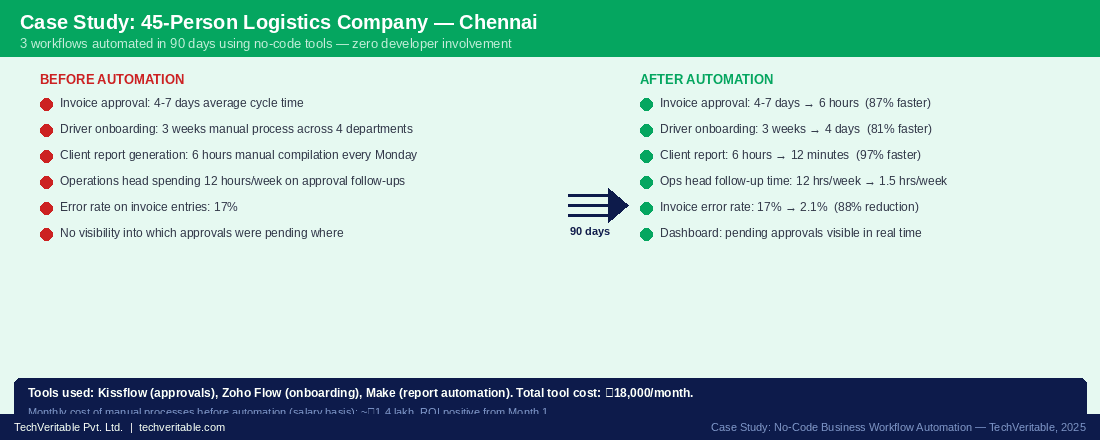
Invoice approval cycle time | 4-7 days | 6 hours | 87% faster |
Driver onboarding time | 3 weeks | 4 days | 81% faster |
Client report compilation time | 6 hours manual (Monday) | 12 minutes automated | 97% faster |
Ops head follow-up time | 12 hours/week | 1.5 hours/week | 88% reduction |
Invoice entry error rate | 17% | 2.1% | 88% reduction |
Monthly tool cost | ₹0 | ₹18,000/month | ROI positive from Month 1 |
Figure 5: Chennai logistics company before-and-after — 3 workflows, 3 tools, 90 days, zero developers. Total tool cost: ₹18,000/month against ₹1.4 lakh/month in manual process costs. (Source: TechVeritable client engagement, 2025)
Ready to automate your first workflow without writing any code? TechVeritable helps SME founders and ops managers identify the right processes, select the right tools, and build the first automation — in 5 working days. We handle the mapping, the configuration, and the testing. You handle your actual business. Book a free 30-minute automation scoping call → techveritable.com/contact |
Frequently asked questions
How long does it take to build a first automation with no-code tools?+
For a single, well-mapped workflow — like an invoice approval flow or a lead-to-CRM sync — most no-code platforms allow a first working automation to be built in one to three working days. This assumes the process has been mapped on paper first. Without prior mapping, "building in a day" usually means rebuilding three times over two weeks. Our consistent experience: the mapping phase takes 1-2 days, the build takes 1-2 days, testing takes 1 day. Total: 5 working days from decision to live for a simple flow.
What if our processes are too complex for no-code tools?+
Most SME processes that feel complex are actually compound simple processes — they involve multiple steps, multiple approvers, or multiple systems, but each individual step is rule-based and repeatable. No-code platforms like Make handle branching logic, conditional routing, and multi-system integrations well. The processes that genuinely exceed no-code capabilities are those requiring real-time AI inference, complex database transformations, or extremely high transaction volumes. For most SMEs at 20-200 employees, a well-configured no-code flow handles every scenario.
What happens if the automation breaks?+
This is the most common concern, and it is worth taking seriously. All major no-code platforms include error handling, execution logs, and automatic failure notifications. When a flow fails, you receive a notification, and the system logs exactly which step failed and why. Most platforms also allow "hold on error" settings that pause the flow rather than discarding the transaction. Building exception handlers for the scenarios you can anticipate (approver on leave, empty field, system timeout) eliminates 80-90% of the break scenarios in the first month.
Can no-code automation integrate with our existing accounting or ERP software?+
Yes, in most cases. Kissflow, Zoho Flow, and Power Automate all have pre-built connectors for Tally, Zoho Books, QuickBooks, SAP Business One, and Microsoft Dynamics. Zapier and Make offer broader connector libraries for less common accounting tools. For systems without native connectors, integration is achieved through an API (Application Programming Interface) — a standard way for software to communicate. TechVeritable's implementation approach always starts with a systems audit to confirm integration feasibility before selecting or configuring any tool.
Is no-code automation a good fit even if we already have a developer on our team?+
Yes — and arguably more so. Having a developer does not mean they should be building your invoice approval flows. Developers are expensive and their time is better spent on competitive product work than on workflow configuration. No-code tools let your ops manager or business analyst own the process automation layer, keeping developer capacity for the technical work only they can do. In our experience, teams with developers adopt no-code automation faster because they have someone who can handle the edge cases without building a custom solution.
How does TechVeritable help with no-code business workflow automation?+
We run a 3-day engagement that covers: process selection and prioritization (Day 1-2), workflow mapping including exception scenarios (Day 2-3), tool configuration and build (Day 3-4), and testing with real data followed by team handover (Day 5). We do not just configure a tool and leave — we train your team to maintain and expand the automation without us. After go-live, we offer 30 days of post-launch support. If you have identified a specific workflow you want to automate, book a 30-minute scoping call at Tech-veritable.com/contact and walk us through it.
Want to find the same leaks inside your operation?
TechVeritable maps workflows, identifies operational leakage, and builds automation and KPI systems around the places where work gets stuck.